Create a support bundle for VM based appliance
For Hyperscale Appliance deployment, support bundles can be generated in multiple ways, each providing a different scope of logs and other details.
Using the Delphix Admin GUI
This is the recommended method to generate the support bundle.
The support bundle will include the logs from Appliance, Hyperscale Application Manager, and Hyperscale services.
For Hyperscale Appliance (OVA) deployments, use the setup UI for support logs in the Creating support logs page.
Using Hyperscale Application Manager Swagger UI
This will generate the support bundle related to the Hyperscale application layer. It will include the logs for Hyperscale Application Manager, and Hyperscale services.
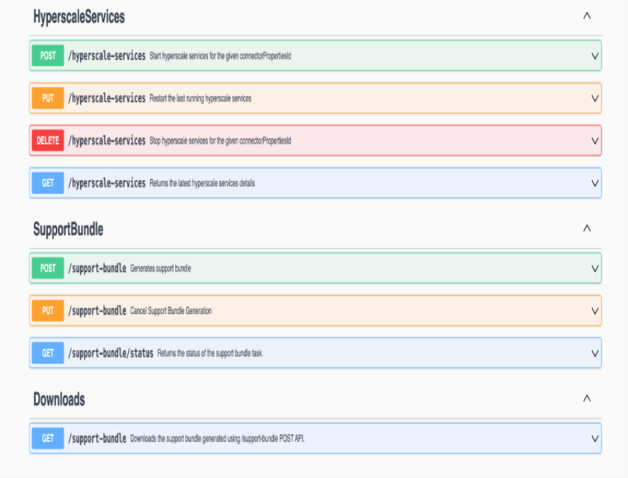
POST /support-bundle API
The POST /support-bundle endpoint is to trigger the asynchronous process to generate the support bundle. The following is an example of the response:
{
  "id": 1,
  "reference": "hyperscale-support-20251118-10-57-32",
  "status": "RUNNING",
  "start_time": "2025-11-18T10:57:32.692216936Z",
}
PUT /support-bundle
The PUT /support-bundle API is useful to cancel any RUNNING support-bundle asynchronous generation.
The following is an example of the response:
{
  "id": 1,
  "reference": "hyperscale-support-20251118-10-57-32",
  "status": "CANCELLED",
  "startTime": "2025-11-18T10:57:32.692216936Z",

     "endTime": "2025-11-18T10:57:36.554821637Z"
}
GET /support-bundle/status API
Since the generation of support bundle is an asynchronous process, it is helpful to know the status of the support bundle activity by utilizing the GET /support-bundle/status endpoint.
In the response of the API, the current status of the support-bundle generation can be identified by the field status.
The following is an example of the response:
GET /support-bundle/status API
Since the generation of support bundle is an asynchronous process, it is helpful to know the status of the support bundle activity by utilizing the GET /support-bundle/status endpoint.
In the response of the API, the current status of the support-bundle generation can be identified by the field status.
The following is an example of the response:
{

  "id": 1,

  "reference": "hyperscale-support-20251118-10-57-32",

  "status": "SUCCEEDED",

  "startTime": "2025-11-18T10:57:32.692216936Z",

  "endTime": "2025-11-18T10:57:36.554821637Z"

}
GET /support-bundle API
GET /support-bundle API can be triggered to download the generated support-bundle when status from the response of GET /support-bundle/status is received as SUCCEEDED or PARTIAL_SUCCEEDED
The response of this API will be in octet-stream and a download link will be provided of the support-bundle tar file.
Using Hyperscale Compliance Swagger UI
It includes the logs and other details only for the Hyperscale services. To generate support bundle using Hyperscale Compliance UI, refer to How to generate a support bundle